

A beginner’s guide to building your first robot
 By
Leah Morrison
By
Leah Morrison
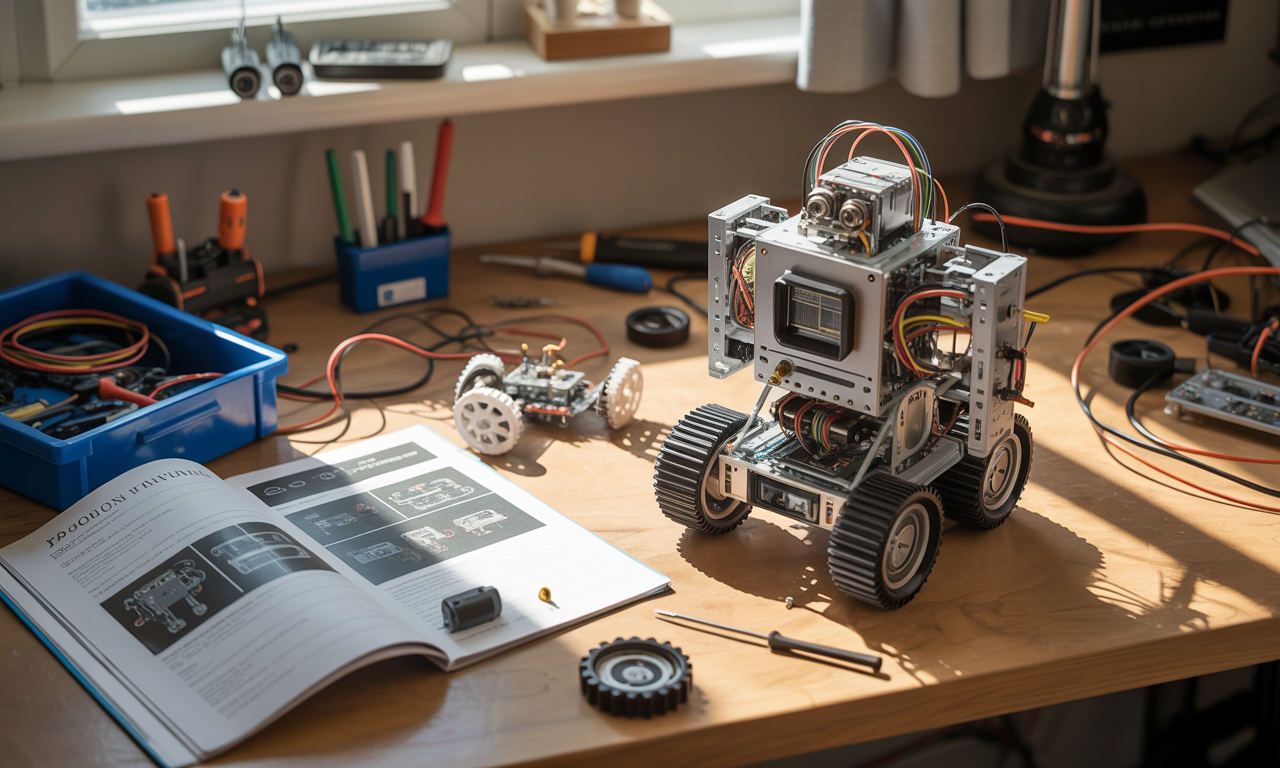
With robotics becoming a cornerstone of both industry and everyday life, there’s never been a more thrilling moment to build your very first robot. The global robotics landscape is rapidly expanding, with forecasts predicting more than 20 million robots in active use by 2030. It’s clear that basic robotics know-how is becoming an essential, future-proof skill, whether you’re interested in launching a new hobby, developing professional expertise, or simply exploring the mechanics behind smart machines. This detailed guide blends foundational theory with hands-on steps, helping complete beginners and those with a hint of prior experience confidently craft a simple, functional robot at home. Expect to learn about must-have components, programming fundamentals, trusted brands like Arduino and Raspberry Pi, and practical tips that bring your machine to life as you enter the dynamic world of robotics.
Understanding What a Robot Is and Why Robotics Skills Matter
A robot isn’t just a remote-controlled gadget; it’s an electromechanical device that senses its environment, processes data, and makes decisions to perform tasks autonomously. Unlike appliances, such as toasters or old-school cars, a robot recognizes and responds to change around it thanks to its array of sensors, actuators, and a microcontroller “brain.” In 2025, robotics is more than an industry trend: it’s an educational movement. Platforms like Arduino, Raspberry Pi, and Lego have bridged the gap, making robot building accessible to everyone from curious teens to career engineers. Learning robotics encourages analytical thinking, develops technological literacy, and fuels creativity in solving real-world problems.
- Critical thinking: Troubleshooting and iterating robot designs builds perseverance and logic.
- Creativity: Combining parts in innovative ways sparks experimentation.
- Real-life applications: From simple line-following bots to complex industrial machines, robots are shaping our world.
Essential Parts That Power Every Robot
Every robot, no matter how simple, relies on a handful of key components.
- Microcontroller (e.g. Arduino UNO, Romeo, Raspberry Pi): Acts as the robot’s brain, running programs and making split-second decisions.
- Motors and motor drivers: Convert electrical energy into movement. Essential for making your robot roll, turn, or perform specific actions.
- Sensors: Eyes and ears for the machine. Popular options like infrared or grayscale sensors let robots detect obstacles, follow lines, or avoid edges.
- Power source: Batteries and switches distribute and control energy for safe, reliable function.
- Chassis/platform: The robot’s skeleton, often wheeled for beginner projects. Kits from Lego, DFRobot, Makeblock, and VEX Robotics offer versatile solutions.
Choosing a simple, wheeled chassis, as offered by many kits, is ideal for those just starting out, thanks to ease of assembly and stability.
Choosing Your First Robot Kit: Popular Brands and Key Factors
Navigating the world of DIY robotics kits can be overwhelming. Renowned brands like Arduino, Raspberry Pi, Lego Mindstorms, Makeblock, VEX Robotics, Parallax, SparkFun, Adafruit, Trossen Robotics, and DFRobot offer a wealth of starter kits suited to all interests and budgets. To ensure your first build leads to success and inspiration, consider your goals, skill level, and how much guidance a kit offers.
- Project type: Line-followers, sumo bots, robotic arms, and obstacle-avoiders are popular beginner choices.
- Ease of assembly: Kits with clear instructions and pre-wired components help you learn without frustration.
- Reusability: Some sets, notably those from Lego, promote experimentation and multiple designs.
- Community support: Well-known brands have extensive online forums and tutorials, critical for troubleshooting and learning (e.g., SparkFun’s online resources).
Recommended Robot Kits for Beginners
- DFRobot Pirate 4WD Arduino Kit: Great for mobile robots, includes Bluetooth control.
- Lego Mindstorms Robot Inventor: Modular blocks make it accessible for all ages.
- Makeblock mBot: Designed for education, with strong coding support.
- VEX Robotics Starter Kits: Robust parts, ideal for learning structured assembly.
- SparkFun RedBot: Focuses on sensing and movement with clear online guides.
Step-by-Step Assembly: Building Your Simple Arduino Robot
Once you have your preferred kit, building your first robot is about following logical steps and enjoying the process. Below are essential steps for a typical Arduino-based wheeled robot, though instructions apply to most kits.
- Gather your tools: You’ll need a screwdriver set, a soldering pencil for wiring, needle-nose pliers (optional), and a wire stripper.
- Assemble the motors and chassis: Secure motors with screws, washers, and gaskets as advised. Attach wheels to ensure balanced movement.
- Soldering: Attach black and red wires to each motor, carefully strip insulation, and solder wires in place for reliable connections.
- Mount the microcontroller and battery: Secure the Arduino UNO (or Romeo BLE controller for Bluetooth projects) using copper supports; position the battery beneath the robot.
- Install the power switch: Wire a simple switch to regulate power, maintaining good safety practices.
- Hook up the motors and sensors: Connect completed motor wires into the microcontroller board’s dedicated ports; add sensors according to your kit’s layout diagram.
- Final assembly: Add side plates and bumpers, then mount the final platform securely before fitting wheels.
Programming Your Robot: From Sample Code to Interactive Behaviors
Now comes the most exciting part: making your robot move. With the hardware in place, download and upload sample code (such as MotorTest.ino) to the microcontroller using the Arduino IDE or the software recommended by your kit.
- Supported programming languages: C/C++ (Arduino), Python (Raspberry Pi), graphical code (Lego), Scratch, Blockly, and others.
- Key concepts: Inputs/outputs, sensor reading, motor control, and decision-making logic are fundamental, and any beginner’s course incorporates these.
- Uploading your code: Connect to your laptop/PC via USB, select the board type, and load the code, then watch your robot come alive.
If the robot doesn’t move as expected, double-check wiring connections, verify power, inspect uploaded code, and adjust as needed. Every issue resolved hones your technical skill set for more complex builds down the line.
Adding Sensors and Actuators: Bringing Intelligence to Your Creation
To interact with its surroundings, your robot relies on sensors and actuators. While motors provide movement, sensors help navigate, avoid obstacles, and track lines. Most beginner kits from brands like Parallax, Makeblock, and Lego come equipped with easy-to-integrate sensors.
- Infrared sensors: Detect distance, follow lines, and help in simple navigation.
- Bumper switches: Detect collisions and trigger stop or reverse actions.
- Servo motors: Control arms or grippers for manipulation tasks.
- Ultrasonic sensors: Enable advanced obstacle detection and avoidance.
Connecting and Calibrating Sensors
To install a sensor, plug it into the corresponding slot on your microcontroller or mainboard, kits by Adafruit and SparkFun often use color-coded ports and come with calibration instructions. Test each sensor with simple code snippets to observe real-time responses (such as LEDs lighting up or motors changing speed), then tweak your robot’s program to create more advanced behaviors. This hands-on trial-and-error is where true innovation in learning robotics occurs.
- Attach and test one sensor at a time.
- Check the kit’s documentation for sample calibration routines.
- Mix sensor types for creative autonomous behaviors.
Overcoming Common Robot Building Challenges
All robot builders encounter challenges, especially in the wiring and coding stages. Loose connections, incorrect wiring, or initial programming errors can stall your progress, but these hurdles are part of the learning curve. Leveraging the broad support community around brands like Arduino, VEX Robotics, and SparkFun can accelerate troubleshooting.
- Check all wiring: Ensure no loose connections and correct polarity, mistakes here are a main source of malfunctions.
- Debug your code: Review syntax and logic; harness debugging tools integrated in most software environments.
- Isolate components: Test motors, sensors, and connections individually to pinpoint or eliminate fault sources.
- Use community resources: Popular forums, YouTube tutorials, and GitHub repositories are invaluable for solution finding.
Persistence pays off: every challenge conquered increases your confidence and technical skill for future projects.
Expanding Your Robot: Advanced Features for Future Projects
Once your robot confidently drives and senses its world, you can take it to the next level. With growing confidence and curiosity, adding features like cameras for computer vision, QR code readers for smart navigation, or even a web app interface for remote control is completely feasible. Kits from Adafruit, DFRobot, and Trossen Robotics offer expansion modules focused on these enhancements.
- Integrate camera modules for image recognition, object detection, and advanced navigation.
- Enable QR code scanning to trigger robot actions based on coded inputs in the environment.
- Develop a web app interface using HTML, CSS, and JavaScript to adjust controls and monitor sensor data from your browser via Wi-Fi or Bluetooth.
With each new feature, you broaden your understanding, inching closer to more complex robotics design and problem-solving.
Care, Maintenance, and Safe Practices for Your DIY Robot
Building your robot is just the start; regular maintenance ensures it remains functional and safe. Essential practices include careful handling during soldering, battery safety, and routine cleaning.
- Follow safety steps: Unplug batteries and power before working on electrical parts.
- Regular maintenance: Inspect for loose wires or worn components after every run.
- Clean sensors and wheels: Prevent dust build-up to maintain peak performance.
- Store properly: Keep away from excess humidity or direct sunlight to preserve electronic life.
Safe habits and a little preventative care ensure your investment delivers long-term, uninterrupted fun and learning.
Your First Robot: Skills Gained and Next Steps in Robotics
Building your first robot isn’t just about assembling wires and wheels, it’s about sparking curiosity, cultivating technical thinking, and joining a growing global community. Brands like Arduino, Raspberry Pi, and Lego invite both new and experienced builders to start with simple projects and steadily embrace greater challenges. With each success, you’ll find yourself tackling more ambitious designs, applying your skills to real-world problems, and perhaps even charting a path toward a dynamic career in robotics as the decade unfolds.
- Practice basic assembly and programming before adding complexity.
- Learn from mistakes; each iteration deepens your understanding.
- Never stop exploring, today’s simple bot could spark tomorrow’s breakthrough innovation.